


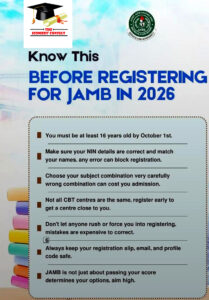
Important Tips
- NIMC Corrections: Any necessary corrections (e.g., Name, Date of Birth, Gender, State of Origin) must be made with NIMC early and reflected on their portal before starting JAMB registration.
- Unique Identifiers: Phone numbers and email addresses are unique to each candidate. They cannot be shared or changed and must remain functional throughout the process.
- Biometric Issues: If biometric capture fails, candidates should visit a JAMB office immediately. Do not allow any CBT centre to force-register you.
- Dual Screens: Ensure a dual screen is used during registration so you can confirm your passport photograph and biometrics are captured correctly in real-time.
Common Challenges and Solutions
- “Error 550/66019” / Wrong Parameter:
Indicates an incorrect format. Ensure you use the correct command:NIN [space] YourNINto 55019 or 66019. - “Number Already Registered”:
Means the phone number has already been used to generate a profile code. Candidates must retrieve and use that specific SIM card to receive the code. - “Unable to Verify NIN”:
Usually a temporary network or server issue. Candidates are advised to wait and retry later. - “Record Not Found”:
Implies the NIN is not in the NIMC database. Candidates should visit the nearest NIMC office for validation.
Note: The JAMB 2026 UTME registration is set to commence soon. Prospective UTME Candidates are therefore advised to start preparing for their exams.
You can reach via our contact details below to register for your physical and online classes for your adequate preparation.
We also provide: Mentorship and Guidance for admission processing into any institute of your choice
Contact us today for your Registration
07042460066, 09026431200
subscribe to our WhatsApp channel for more instant updates